Xuper TV APK v7.8.1 Download Updated Version Android [2026]
Install the v7.8.1 version of Xuper TV on your Android phone or TV using two separate files: one for touchscreens and one for remote control. Below you'll find the technical specifications, step by step installation instructions, and solutions to common problems.
Security verified
- File reviewed
- No root
- Free
Before publishing each link, we check that the file installs, opens, and retains its signature. We do not add anything to the APK or request personal information to download it.
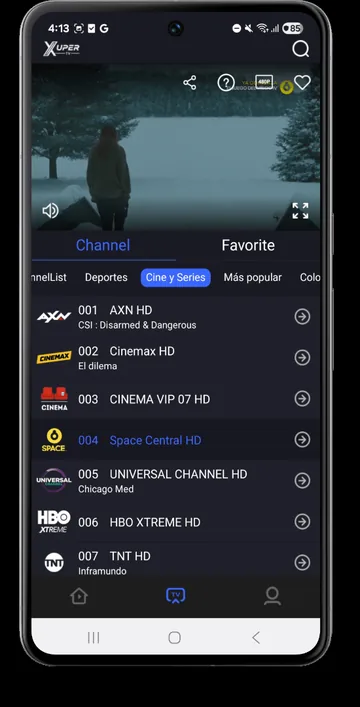
Table of contents
- Specs
- What is Xuper TV APK?
- From Magis TV to Xuper TV
- Main functions
- What's changed in the current version
- How to install Xuper TV on Android
- First steps within the app
- Xuper TV on Smart TV, TV Box and Fire Stick
- Xuper TV on PC and iPhone
- System requirements
- Advantages and disadvantages
- Is downloading Xuper TV safe?
- Why Xuper TV isn't working and how to fix it
- Alternatives to Xuper TV
- Tips for a better experience
- Conclusion
- Frequently Asked Questions
Specs
| Name | Xuper TV APK |
| Category | Entertainment, streaming television |
| Version | v7.8.1 |
| Mobile file size | 51.1 MB |
| File size for TV | 32.4 MB |
| It requires | Android 5.0+ |
| Devices | Phone, tablet, Android Smart TV, TV Box and Fire Stick |
| App language | Spanish |
| Download price | Free |
| Available on Google Play | No, it installs as APK |
| Last review | November 2026 |
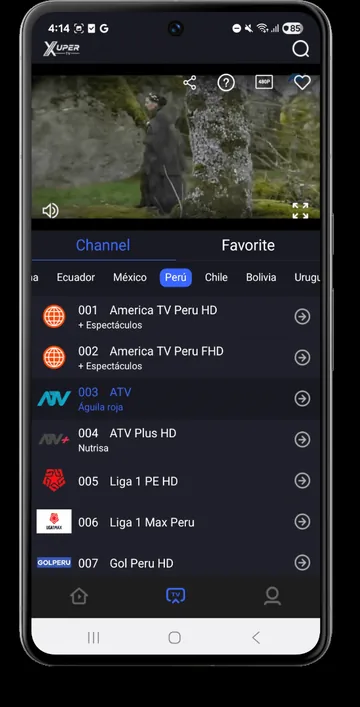
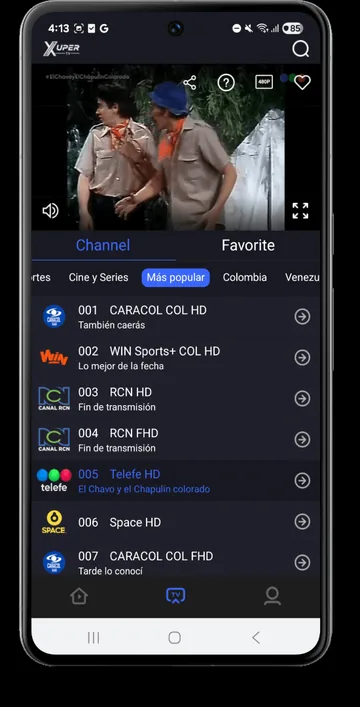
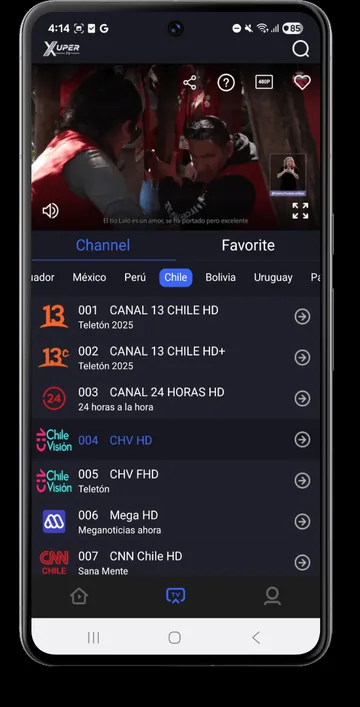
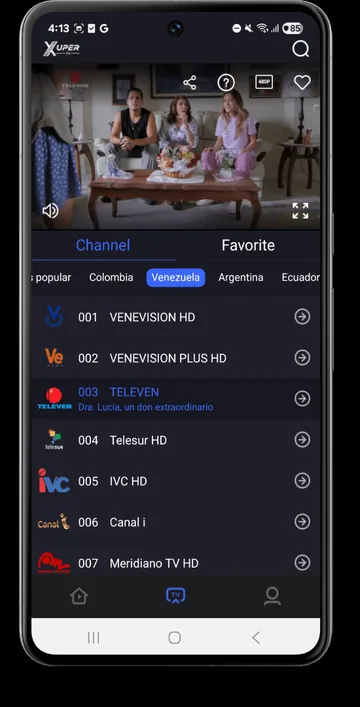
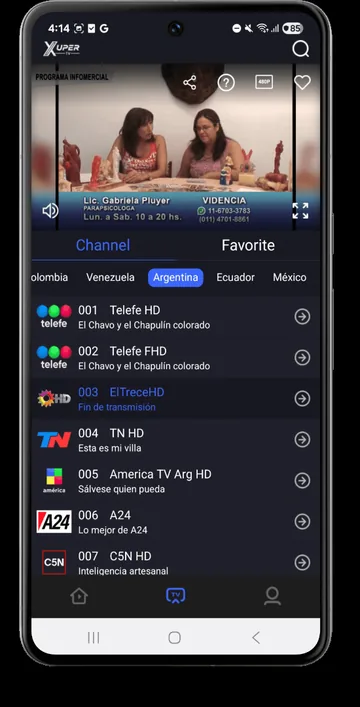
Actual screenshots of the app on an Android phone. The logos of each channel belong to their respective owners.
What is Xuper TV APK?
Behind the name Xuper TV APK is an Android entertainment app that brings together live TV channels, movies, and series in a single interface. Its main audience is in Latin America, and it shows: the channel list is grouped by country, with tabs for Peru, Colombia, Chile, Venezuela, Argentina, Mexico, Ecuador, Bolivia, and Uruguay, in addition to thematic sections such as sports or movies and series.
Since it's not available on Google Play, the only way to get it is to manually install the APK. This might seem a little daunting at first, but the process only takes a couple of minutes, and we'll explain it in detail below. The important thing is to download the file from a reputable source that hasn't altered it and to make sure the installer doesn't request any unnecessary permissions for a video app.
There are two versions. The mobile version is designed for touchscreens and is 51.1 MB. The TV version is 32.4 MB and reorganizes the navigation to take advantage of the remote's directional buttons. If you're installing it on a TV, always choose the TV version: the mobile version opens on a large screen, but everything looks tiny and some buttons are ignored by the remote.
From Magis TV to Xuper TV
Many people who search for Magis TV end up installing Xuper TV, and that's no coincidence. For a while, the two names were used interchangeably, and many users switched from one app to the other because the navigation, country organization, and player style are very similar. That's why it's common to see Xuper TV referred to as the successor to Magis TV.
For you, as a user, the practical thing is this: if you previously used Magis TV, you'll find your way around Xuper TV right away. However, they are separate installations. Your favorites or settings from the previous app aren't automatically copied, so you'll have to re select the channels you watch most often.
Main functions
This is what you'll find when you open the app for the first time. We've described it exactly as it appeared in our tests, without embellishment.
Live television grouped by country
On Channel you'll see a row of countries at the top and, below, a numbered list of channels for each country. Each row includes the logo, the channel name, and, in many cases, what's currently airing. It's the fastest way to switch between channels in your country without having to search.
Thematic sections
In addition to countries, there are tabs organized by topic, such as Most Popular, Sports, or Movies and TV Shows. These are useful when you don't know what to watch and want to go directly to a specific type of content instead of browsing country by country.
Player above and playlist below
When you tap a channel, the video starts playing at the top, and the list remains visible below. This lets you change channels without leaving the player. A button in the corner switches the video to full screen, and another allows you to share what you're watching.
Favorites
The heart icon saves a channel to the Favorite tab. With five or six channels marked, opening the app and starting to watch takes just one tap.
Movies and TV series
Alongside the live channels, there's a catalog of on demand movies and series. The selection changes over time and depends on the service, not this site, so consider it a bonus, not a permanent library.
TV version
The 32.4 MB TV APK reorganizes menus into large cards that are navigated using the remote's arrow keys. It works on Android Smart TV, TV Box, and Fire Stick.
Quality that adapts to your connection
The player adjusts the quality to your internet speed. With a good connection, you'll see the image in high definition; if the network slows down, the image will become smoother instead of cutting out completely.
Spanish interface
The main menus, section names, and most of the text are in Spanish, which is appreciated compared to other streaming apps that mix languages.
What's changed in the current version
The link on this page points to build v7.8.1. The app developers don't publish detailed changelogs, so we'd rather not create one. However, we can tell you what we noticed when upgrading from a previous version: startup is faster, the channel list loads smoothly, and switching between country tabs is more responsive.
When a newer version is released and we test it, we update the buttons and technical specifications with the new version number. If your app's version number doesn't match the one on this page, you'll need to update it.
To update, you don't need to uninstall. Download the new APK and install it over the existing one; Android will replace the old version and keep your favorites as long as the file signature is the same.
How to install Xuper TV on Android
You need a phone or tablet running Android 5.0+, about 200 MB of free space, and an internet connection. The process is the same for almost all brands; if your phone is Xiaomi, Samsung, or Motorola, this brand specific guide shows you where the exact permission is located on each model.
- Tap the mobile download button. The file will be saved to your Downloads folder. Wait for the download to finish before opening it.
- Open the file. Swipe down the notification bar and tap the download, or find it in the Files app.
- Grant the permission requested by Android. The first time, a warning about installing from unknown sources will appear. Tap Settings and enable the permission only for the app you used to open the file.
- Confirm the installation. Go back and tap Install. If a Play Protect warning appears, read what it means before deciding.
- Open Xuper TV. Tap Open when finished or find the icon on your home screen.
- Remove the permission. Go back to the settings and disable unknown sources again. That way it will install itself without your knowledge.
Are you getting the "App not installed" message? This usually happens when you already have another copy of Xuper TV with a different signature or when there's not enough space. Uninstall the old copy, free up space, and try again.
First steps within the app
When you first launch the app, the initial loading may take a few seconds while the list loads. After that, everything is quite intuitive, but these steps will save you some trouble:
- In the Channel tab, choose your country in the top row.
- Tap a channel from the list. The video will start at the top in a few seconds.
- Mark the channels you watch daily with a heart to find them in Favorite.
- Rotate your phone or tap the full screen icon to view it larger.
- If a channel doesn't load, try the next one on the list and come back later; sometimes the signal drops for a while.
Xuper TV on Smart TV, TV Box and Fire Stick
To watch on the big screen, use the 32.4 MB TV APK. On an Android TV or TV Box, you can download it using the device's browser or transfer it with a USB drive. On a Fire Stick the usual method is to use the Downloader app, which lets you enter a URL and download the file directly.
The step by step instructions for each device, with the exact menu names, are in the Xuper TV guide for Smart TV.
Xuper TV on PC and iPhone
There is no official version for Windows or Mac, but you can run the APK on an Android emulator. We explain the method for Xuper TV on PC and compare the two most popular emulators: BlueStacks and LDPlayer.
On iPhone and iPad the answer is shorter: iOS does not install APK files. The page about Xuper TV on iPhone explains the available workarounds and the scams that are circulating.
System requirements
Xuper TV is lightweight for what it does. This table summarizes our recommendations after testing it on devices of different price ranges.
| System | Android 5.0+ |
| RAM | 2 GB minimum, 3 GB or more for smooth operation |
| Free space | 200 MB for the APK, the app and its cache |
| Internet for SD | 5 Mbps stable |
| Internet for HD | 10 Mbps or more; ideal with a wired connection or with a 5 GHz network |
| Screen | Anyone; on TV use the TV APK |
Advantages and disadvantages
Advantages
Disadvantages
Is downloading Xuper TV safe?
The security of an APK depends on who packaged it. The risk isn't in the format itself, but in files that someone opened, modified, and repackaged to include aggressive advertising or worse. That's why it's a good idea to perform a few quick checks every time you install one:
If you want to go a step further in how to verify that the APK is correct, we'll show you how to check the file's fingerprint from your phone.
Why Xuper TV isn't working and how to fix it
Almost all the problems our readers write to us about have one of these causes. Try the solutions in order, from the simplest to the most drastic.
The channel list is not loading
First, check your connection by opening any webpage in your browser. If the internet is working fine, close the app completely from your recent apps list and reopen it. Often, that's all it takes.
The video freezes or cuts out.
It's usually the network. Move closer to the router, switch to the 5 GHz WiFi when the router offers it, or close other downloads. If only one channel is failing, the problem is with that signal, not your device.
The app closes by itself
Go to Settings, Applications, Xuper TV, Storage, and clear the cache. If the problem persists, install the latest version over the existing one. The cache and storage guide provides step by step instructions.
"App not installed" message appears
Uninstall any previous copies of Xuper TV, check that you have free space, and reopen the downloaded file. If the file downloaded only partially, download it again.
Alternatives to Xuper TV
If you prefer services available in official stores, these free or basic plan options work well in Latin America:
- Pluto TV: free live themed channels and ad supported movies, available on Google Play
- ViX: series, soap operas and sports in Spanish, with part of the catalog free
- Tubi: movies and series on demand for free, with commercial breaks
- Plex: Free movies and live channels, plus your own video library
- YouTube: Many news outlets broadcast live from their official channels
Tips for a better experience
Conclusion
Xuper TV lives up to its promise: open the app and have channels from various Latin American countries at your fingertips, with a user friendly Spanish interface. Its main drawback is that it's not available on Google Play, so you're responsible for installing and updating it yourself. If you choose the correct file for your device and complete the security checks, you'll have it up and running in about five minutes.
Frequently Asked Questions
What is the difference between a mobile APK and a TV APK?
The mobile version (51.1 MB) is designed for touchscreens. The TV version (32.4 MB) modifies the menus for use with the remote control. Install the version that corresponds to your device.
What is the latest version of Xuper TV?
The version we're linking to now is v7.8.1. When a newer version comes out and we test it, we'll change the file and the number on this page.
Does Xuper TV cost money?
Downloading the APK from this page is free. The app's features depend on the service itself and may change.
Why isn't it on Google Play?
Xuper TV isn't published on the Google Store, so it's installed as an APK. This is the same situation as many independent streaming apps.
Does it work on iPhone?
No. iOS does not install APK files. It only works on Android, Android TVs, TV Box, and Fire Stick.
Can I install it on my computer?
Yes. Install BlueStacks or LDPlayer and add the APK file; the PC guide explains how.
Will I lose my favorites when I update?
They are preserved when the update is installed over the existing app. Uninstalling first will delete them.
What do I do if Play Protect blocks the installation?
Check what type of notification it is. If the file came from this page and its size matches, you can choose to install it anyway; if you have any doubts, don't install it and write to us.